How I write my documents
I have fallen in love. If you are somewhat close to me, you may be aware of how picky I can get when it comes to format files: I despise Microsoft Word (.docx) with all my being, I don't want to get near Google Docs, and please get your crappy proprietary format out of my face. In contrast, I'm all for open formats — especially those which are easy to read and write.
There this piece of technology I've been obsessed lately: Typst. What is it? It's a free and open source markup language that compiles to PDFs and images (HTML is down the road). It feels as if Markdown, Rust, and Python were fused together to create a new language.
As a college student, writing essays and presentations is part of my daily life at this point. Sadly enough, more often than not, I'm kind of force to use tools I hate in college, and if something I've learned throughout my tech journey is that getting people to care about these kinds of things is almost a lost cause1.
Regardless of the tool being used, I love writing. However, Typst is placed right in the center in a Venn diagram at the intersection of writing, coding, and math in an easy to write language that just tickles my brain, making the experience even more enjoyable.
As an advocate for the LibreOffice suite2, I may end up completely making the switch to Typst. Not because LibreOffice is bad — it has its own use cases base, and user base. I believe you should use them if Typst is not for you. That said, having absolute control about every little detail in your document through simple text is mind-boggling. It's just like how through plain text you can build complex software.
Now, this is not my first time being exposed to a typesetting system, you cannot escape the existence of LaTeX. It's almost guaranteed you must've heard it at some point (if no, congratulations, you have now!) and the love-hate relationship its users have with it. Therefore, it's not a surprise Typst has grown in popularity as an alternative because of this.
When I first encountered it, I didn't pay too much of attention to the project, I didn't have a use case for it: "I'm not writing complex mathematics after all" — That's what I told to myself. However, Typst is not only for those writing "complex math". If you are in pretty much any field where you have to do extensive writing, it can be a viable alternative to a traditional word processors, with the advantages of: a) not being scared to death by adding an image and breaking everything apart. b) not having to waste time using a mouse (you are writing after all). c) not having to memorize a set of shortcuts that can vary depending on your language and editor. d) freedom. e) it's just fun!
Here is my workflow whenever I'm going to write something.
- Create a new folder.
- Create a new document ending with
.typ. - Create a bibliography.yml to automatically create a bibliography page with my sources.
- Start a git repository to track even the more minuscule change through its existence, it's just a plain text file after all.
- Execute
typst watch homework.typto visualize my edits immediately. - Open VS Codium or Neovim to edit the file.
- Profit?
That's it! Now I can just lock in into writing following simple markup language and a couple of functions. Here how it works:
For titles, just add an equal sign in front of them:
= This is a big title.
== A secondary title.
=== A tertiary title.
You get the idea. By doing this you get an automatic index too. Oh! Do you want to enumerate your titles? No worries, you do not have to go through each one of them. Just add to the top of the file:
#set heading(numbering: "1.1");
voilà!
All your headings are following a pattern. You can even create your own patterns!
The same can be done with pages:
#set page(numbering: "(1/1)");
What about listing things? That is a pretty common thing to do, right? It's just as easy. Just place a plus sign before the item if you want to enumerate it.
+ This comes first.
+ This comes second.
+ Share this article.
If you do not want to enumerate them, use a minus sign instead. Obviously, it has bold text (typst *This is bold text in Typst*), italics, (typst _This is italic text in Typst_), and all that good stuff.
One of the most frustrating experiences while using a word processor, is having to deal with tables. Just kill me already and end with this pathetic misery! But with Typst!? Oh, man! I want to keep on living and have a beautiful life. It's just damn simple!
#table(
  columns: 3,
  table.header("Title 1", "Title 2", "Title 3"),
  [Content 1], [Content 2], [Content 3]
)
That was a dead simple example by the way, it can be more complex than that with: backgrounds, gaps, strokes, conditionals, etc.
What about the biggest sin of word processors? Yes, I'm talking about images. We all have seen the memes: "Word when I move an image (insert an image with a broken layout)". You don't have to waste brain power on this. Just add:
#image("./image.png", width: 80%, alt: "A textual description of the image")
That's it. It will automatically place it in the center of the document without having to fight dragging your mouse to place it where you wanted. If you are more fancy:
#figure(
  #image("./image.png", width: 80%, alt: "A textual description of the image"),
  content: "This will be shown behind the image."
) <image-id>
Did you notice the "bibliography.yml.
an-article:
    - type: Article
    - title: A title
    - url: https://example.org/an-article
In your document now, you can just add "@an-article" anywhere and it will send you to the citation page. Simply a work of art.
Let's not get started with writing math, it's just chef's kiss! Have you written a relatively complex math expression in Word or Google docs? If so, I send you my condolences. Let's write a simple integral in Typst.
$ integral x^2 d x $
That's it. Here is the result.
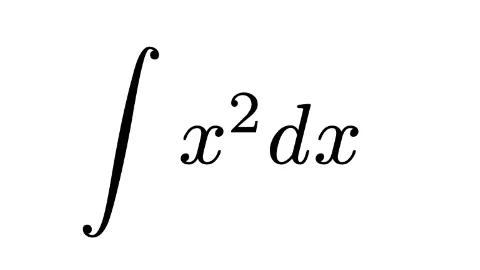
Isn't that so freaking cool!? Doesn't it blow your mind!?
The list of things you can do goes on and on. It's a Turing-complete after all. You can personalize: the type of page, use external packages, write functions, create templates.
I'm still going through the rabbit hole, there's still a huge amount of things I need to learn, but it has been just a blast. I hope this journey has incentivized you to try it out. Just go to https://typst.app and tell me your experience! :)
Relevant xkcd comic: https://xkcd.com/743/.↩
LibreOffice is a free and open source software alternative to Microsoft Office which grants you more ownership of your files without vendor lock-in through open formats.↩